An honest second opinion on the flat you're about to buy
LoanYield IQ takes the handful of numbers you already know — the agreement value, the rent it would fetch, the loan you'd take — and turns them into the numbers nobody shows you: what the flat really costs once stamp duty, GST and builder charges are in, how much cash you'll burn before an under-construction flat is handed over, what the tax rules give back, and whether the whole thing beats simply investing the same cheques. Then it says, in one sentence, what it thinks you should do.
It has a second job too: the loan you already have. Import the bank's statement or amortization schedule, see exactly where you stand, plan prepayments and step-ups as scenarios, and ask the built-in advisor which loan to close first or what being debt-free in five years takes.
This guide walks through every screen. If you only read one section, read Three scenarios — it's the part that keeps the app honest.
Your first minute
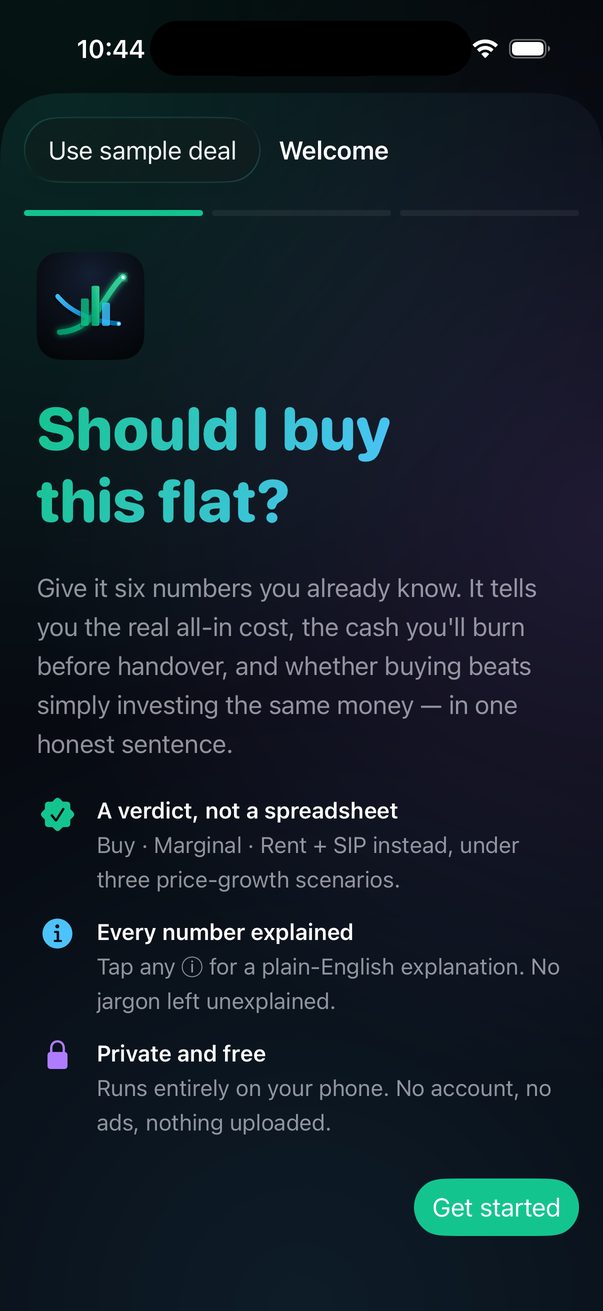
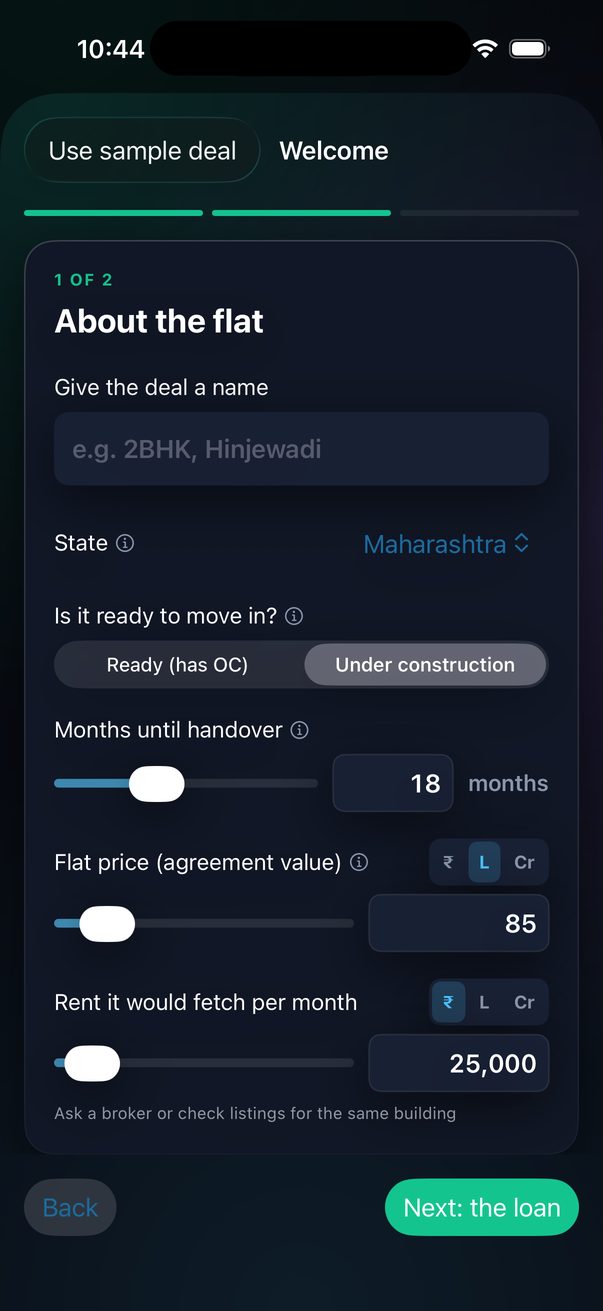
On first launch the app walks you through Quick Start — a welcome page and two short screens that ask for the six things a verdict needs. If you'd rather explore first, tap Use sample deal and play with the built-in 2BHK (it carries a SAMPLE badge until you rename it).
- 1About the property
Choose what you're buying — Flat / house, Shop / office or Plot / open land — name the deal, pick the state, say whether it's ready or under construction, and say whether the price you were quoted is the agreement value or the builder's all-in figure (taxes included — the app backs them out). Then the price and the rent it would fetch. A plot skips the loan page: it's modelled as bought outright.
- 2About the loan
Down payment %, interest rate and loan tenure. The loan amount is shown as you go.
- 3See my verdict
The deal is saved and you land on its verdict. Everything — stamp-duty details, builder charges, prepayments, tax slab — can be changed later from the deal screen, and every change recomputes live.
The same Quick Start runs whenever you choose New deal from the Deals menu. To rename a deal, just tap its name above the verdict and type.
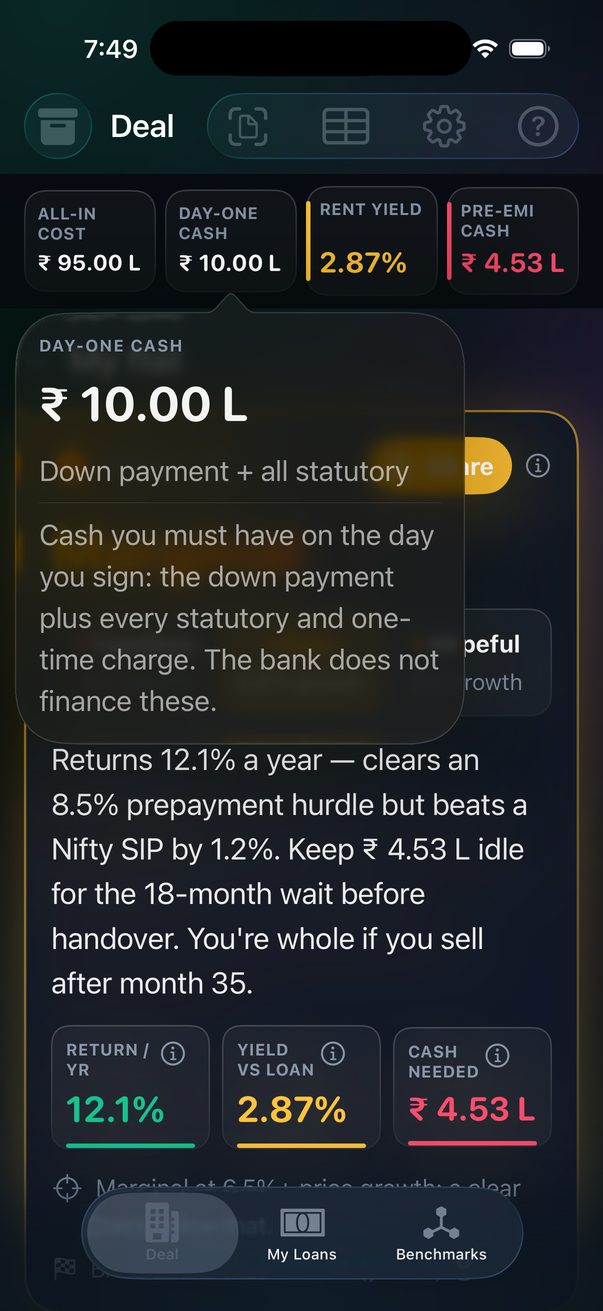
Next to nearly every label and number there's a small ⓘ. Tap it for a two-line explanation of what the term means and why it matters — PLC, MODT, Section 24(b), XIRR, all of it.
Cheat sheet
Everything in the app follows a handful of conventions. Learn these and no screen will surprise you.
85L / 1.2Cr directly.The three tabs
First launch still opens straight into Deal's Quick Start, so a new deal is one minute away regardless of tab order. On iPad the Deal tab becomes two columns — inputs on the left, verdict, chart and tables on the right — and the tab bar moves to the top.
The verdict
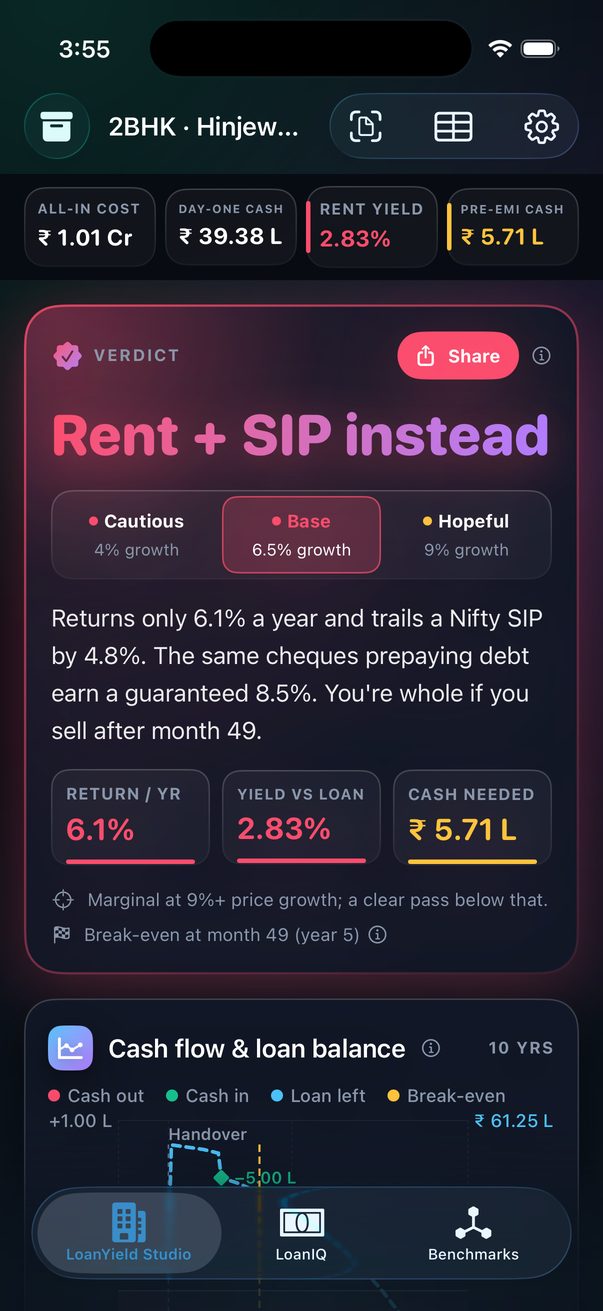
The card at the top of the Studio is the whole app in one glance. It gives one of three calls:
Under the call is one sentence explaining it — the annual return, how it compares to a Nifty SIP, how much cash you need to park before handover, and the month from which selling would return your money. Below that are the three numbers that drive the call:
| Driver | What it is | Green when | Red when |
|---|---|---|---|
| Return / yr | Your 10-year leveraged XIRR — every cheque out, every rupee of rent in, and the flat's value less capital-gains tax on the sale and the loan at the end. | At or above the Nifty SIP | Below the 8.5% prepayment hurdle |
| Yield vs loan | Rent after vacancy, property tax and maintenance, divided by the all-in cost, judged against your loan rate. | ≥ 75% of the loan rate | < 40% of the loan rate |
| Cash needed | Pre-EMI plus property tax during construction (or day-one cash for a ready flat), relative to your day-one cheque. | ≤ 10% of day-one cash | > 30% of day-one cash |
Below the break-even line sits a second, tappable one: Return peaks around year N at X%/yr. Tap it for the full year-by-year table — the annualised return and terminal wealth if you sold at the end of each year instead of riding out the full ten, useful for deciding how long you actually need to hold before the deal pays off.
A 2.8% rent yield is a positive number, but it's shown red because your loan costs 8.5% — the flat loses money every month it's rented. Everywhere in the app, green / amber / red answer "is this good?", never "is this above zero?".
Three scenarios
The single assumption that swings a property decision more than any other is how fast prices grow. So the verdict is never shown once — it's shown three times, and each pill is coloured by its own answer:
| Pill | Price growth used | Read it as |
|---|---|---|
| Cautious | Your assumption − 2.5% (never below 2%) | "What if the market goes sideways?" |
| Base | Your assumption (default 6.5%) | The headline verdict |
| Hopeful | Your assumption + 2.5% | "What if the builder's brochure is right?" |
Tap any pill to swap the headline, drivers and break-even for that scenario. Underneath, a one-line summary says what the decision hinges on — for the sample deal: "Marginal at 9%+ price growth; a clear pass below that."
You're betting on the market, not the flat. The app will say so. Change the Base assumption under Property › More › Price growth per year if you have a better local number.
The four numbers
A strip of four tiles stays pinned at the top as you scroll. Labels wrap on smaller phones or larger text sizes rather than being cut off, and tapping (or pressing and holding) any tile anywhere in the app opens a card with the full label, the full value, its caption and the explanation.
| Tile | Meaning |
|---|---|
| All-in cost | Agreement value + stamp duty + registration + GST + builder extras + loan charges. The real price. |
| Day-one cash | Down payment plus every statutory and one-time charge. The bank finances none of this. |
| Rent yield | Annual rent after vacancy, property tax and maintenance, over the all-in cost. Coloured against your loan rate. The smaller line underneath is cash-on-cash return — the same year's cash flow divided by just the cash you put in on day one, not the full price; tap or hold the tile for both. |
| Pre-EMI cash | For under-construction: the total you'll pay before handover with no rent coming in. For a ready flat this tile becomes Cash / month — your year-one post-tax monthly cash flow. |
The charts
One card, one chart at a time — pick a tab. Each shows a single thing on a single axis, and the app remembers which tab you left it on. Drag a finger across any of them to read a month or year.
| Tab | Shows | Look for |
|---|---|---|
| Cash flow | Rent minus EMI, property tax and income tax, every month for 10 years. Red below zero, green above. | The shaded block before handover (pre-EMI, no rent). Whether the line ever crosses into green. |
| Loan left | Principal still owed. | The step up at handover when the full loan is disbursed; green diamonds where a prepayment knocks it down. |
| Wealth | What the flat is worth (green) vs what you still owe (dashed blue), year by year; the shaded gap is your equity. | The Break-even marker — the year from which selling would return everything paid in. |
| By year | Net cash flow for each year after handover, as bars. | How many years you top up from salary, and by how much. |
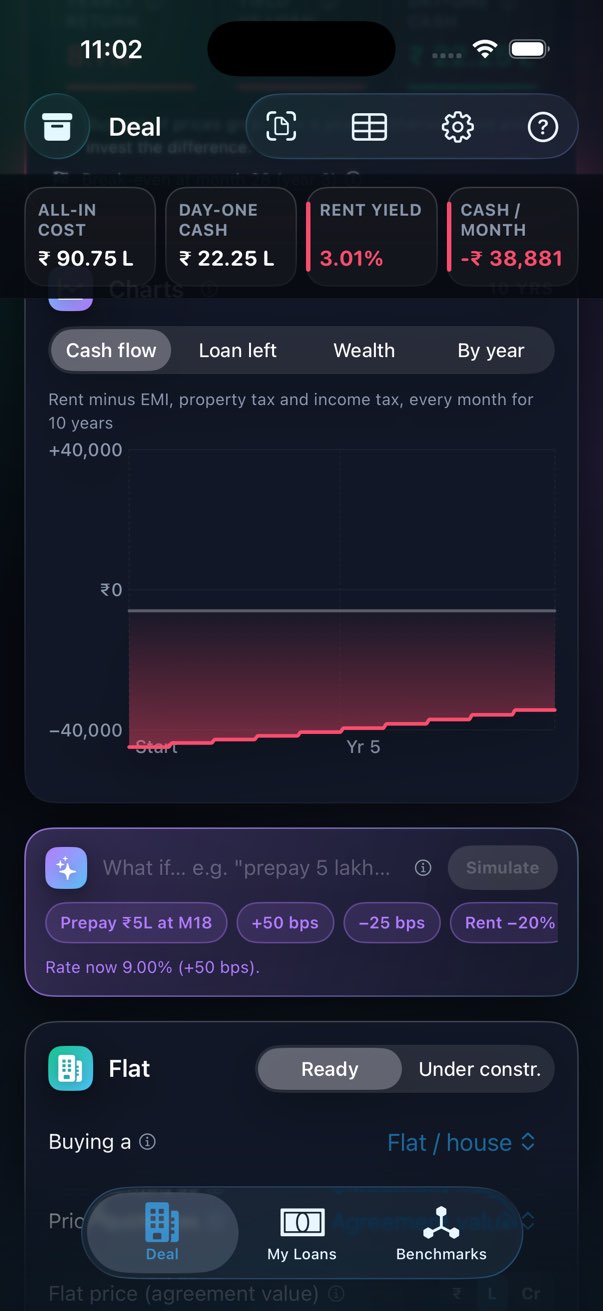
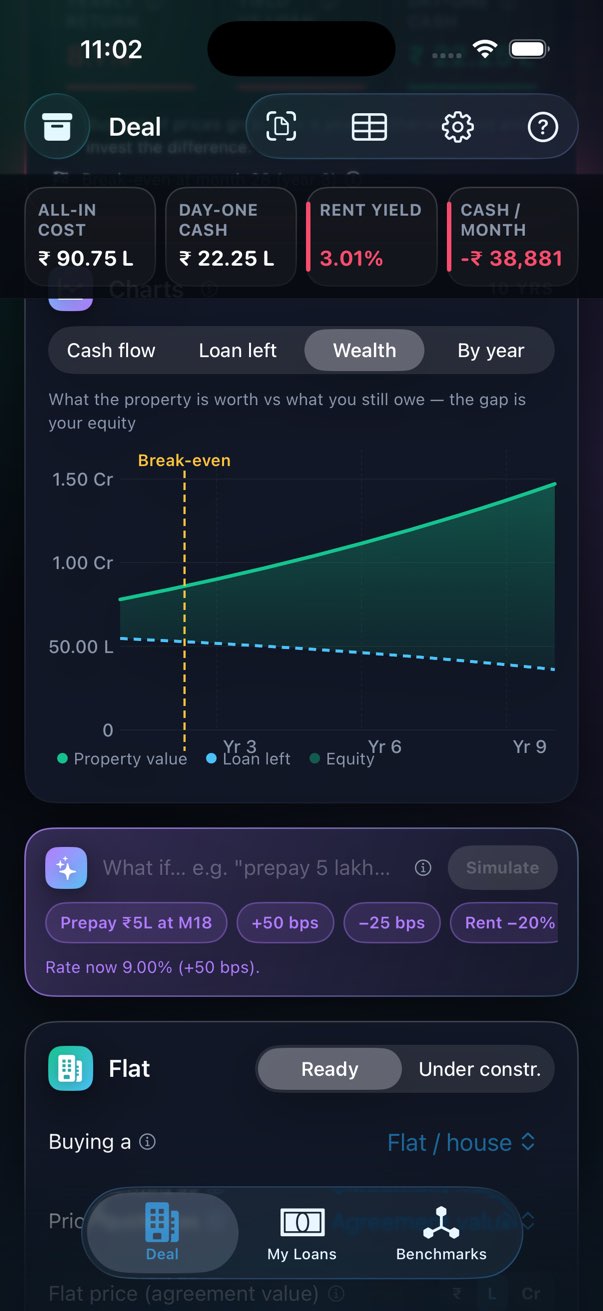
A ₹5 L prepayment would dwarf every monthly bar, so the cash line shows recurring cash only. Prepayments are shown as diamonds on the loan curve, and they are included in the return and break-even calculations.
What-if in plain English
The ✨ bar under the chart understands short commands. Type one or tap a suggestion chip; the whole screen recomputes.
| Say | What happens |
|---|---|
prepay 5 lakhs at month 18 | Adds a ₹5 L lump sum in loan month 18 (also: prepay 2.5L at year 3) |
50 bps hike · 25 bps cut | Moves the interest rate up or down |
rate 9.2 | Sets the rate |
rent 30k · rent -20% | Sets or scales the monthly rent |
tenure 15 years | Changes the loan tenure |
down 25 | Sets the down payment % |
delay handover 12 months | Pushes handover out (under-construction only) |
step-up off / on | Toggles the annual EMI step-up |
clear prepayments | Removes every lump sum |
Commands change the deal permanently (they're just a faster way of moving the sliders). Use Duplicate from the Deals menu first if you want to keep the original.
Property inputs
Property and loan inputs live behind one Edit deal row, collapsed by default once a deal has values — these are "fill in once" details, not something you need open every time you check on a deal. Tap it (or tap the loan line in the verdict) to expand both cards; the row's own subtitle keeps the gist ("Flat · ₹85.00 L · 20% down · 9.00% for 20y") visible while it's closed.
The three you always need
| Input | Notes |
|---|---|
| Buying a | Flat / house, Shop / office, or Plot / open land. Sets GST (5% / 18% / none), whether a loan applies (plots: no), defaults for rate, down payment and vacancy, and the words on screen. |
| Price quoted as | Agreement value — the registered price, taxes on top. All-in (incl. taxes) — the builder's bundled figure; type it and the app solves for the agreement value beneath it (stamp duty, registration and GST backed out, builder extras included, bank charges never). The hint line shows the split. |
| Price (agreement value) | The price in the registered agreement (base cost; floor rise and PLC are added under More). Stamp duty and GST are charged on this. The hint underneath shows your state's duty, the registration fee and the GST rate live. |
| Months to handover | Shown only for under-construction. Drives pre-EMI, the shaded gestation block, and the "Cash before handover" tile. |
| Expected monthly rent | Today's rent for this flat. Escalates yearly; vacancy is deducted. |
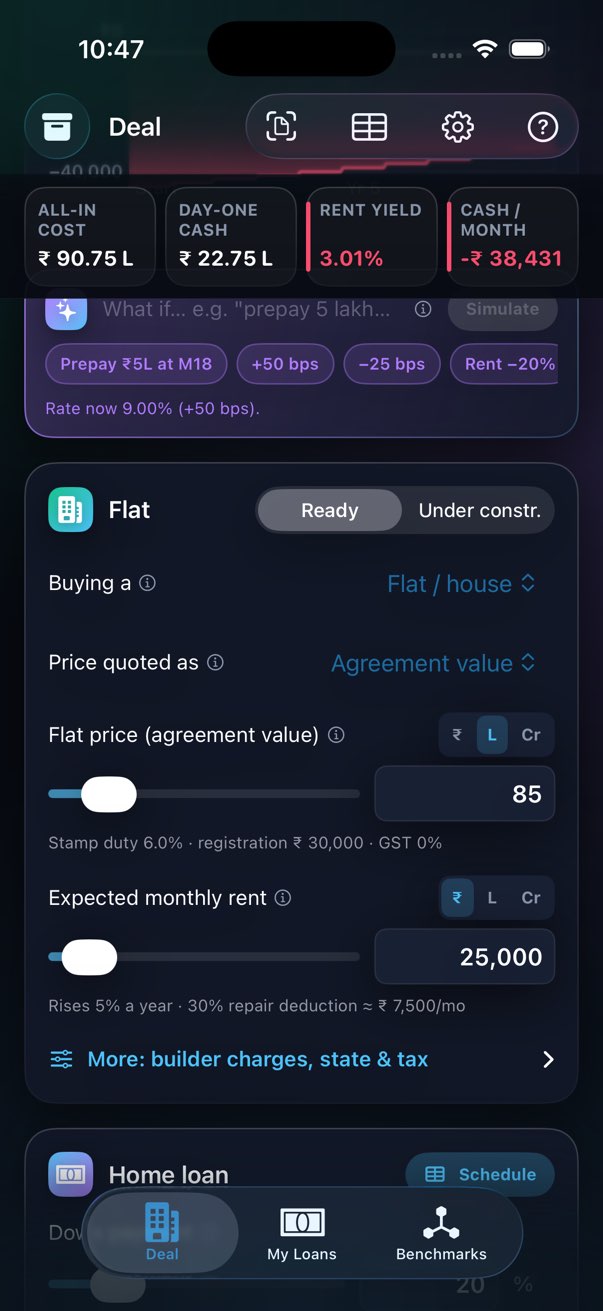
Every control works the same way
Label on the first line, slider plus a typed box on the second. The slider is for what-ifs; the box is for the exact number you know. Money boxes have ₹ / L / Cr unit chips; you can also type 85L or 1.2Cr directly.
| Behaviour | Detail |
|---|---|
| Tapping a box clears it | The old value shows as a placeholder so you can type straight away. Leave it empty and the old value comes back. Done above the keyboard commits. |
| No slider limits on typing | Sliders cover the usual range (e.g. 6.5–13% for a rate) but you can type anything sensible — 5.5%, a 3-year tenure, a ₹12 L flat — and the slider stretches to it. |
| Hard bounds | Money 0–₹100 Cr, percentages 0–100%, months/years 0–1200 — only to catch typos. |
| Two views of one number | Down payment % and loan amount are linked: type either and the other follows. |
More: builder charges, state & tax
| Group | Inputs |
|---|---|
| Statutory | State (Maharashtra, Karnataka, Delhi, Other) · Female sole owner (1–2% duty rebate) · GST category (Ready with OC 0% · Under construction 5% · Affordable housing 1% · Commercial 18%) · Override stamp duty — switch it on to type the exact rupee amount (or 0) instead of the state-computed rate, for an exempt transfer, gift deed, resale, or a state whose actual duty differs from the four modelled |
| Builder charges | Floor rise · PLC · Advance maintenance (12–24 months collected upfront) · Electric / water infra · Legal & franking · Fit-out / interior setup — flooring, electrical, HVAC and ceiling for a bare-shell unit, commonly 15–25% of the price for a bare-shell shop or office · Brokerage — as a flat amount or a % of the price, whichever the broker actually quoted |
| Running the flat & tax | Rent escalation per year · Vacancy allowance · Property tax (annual) · Maintenance / society charges (monthly) — what you pay the society from handover, reduces cash in pocket every month but isn't separately tax-deductible since the flat 30% repair deduction already covers it · Your income-tax slab (0 / 5 / 20 / 30 / 39%) · Price growth per year |
Maharashtra (6%, 5% for women, registration capped at ₹30,000), Karnataka (5.6%, 1% registration) and Delhi (6% / 4% for women, 1% registration) are modelled. "Other" uses 6% and 1% until more states are added — if your state or situation differs, switch on Override stamp duty above and type the real figure.
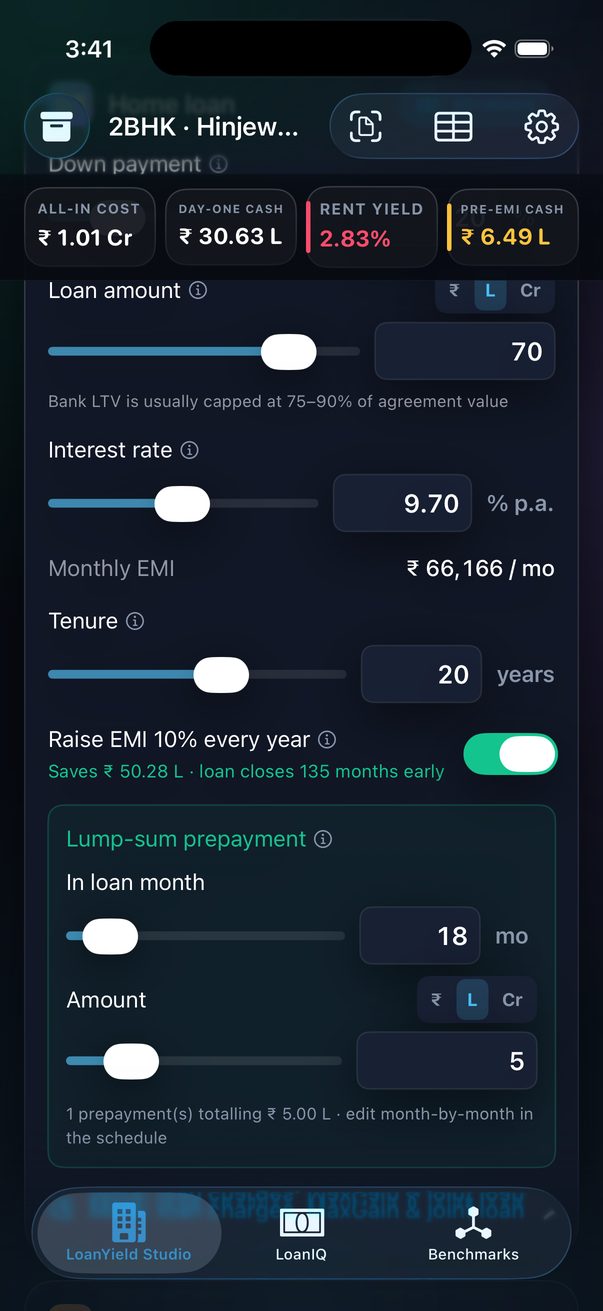
Home loan inputs
| Input | Notes |
|---|---|
| Down payment | Your own money as a % of agreement value (5–90%). |
| Loan amount | The same number the other way round. Type the sanctioned amount and the down-payment % follows, or vice versa. Banks usually cap at 75–90% LTV. |
| Interest rate | Repo-linked floating rate. Rule of thumb: every 25 bps changes a ₹70 L / 20-year EMI by about ₹1,100. |
| Monthly EMI | Read-only — the plain EMI before any step-up. |
| Loan tenure | 5–30 years. Longer = smaller EMI but far more total interest. |
| First full EMI (at handover) | The month the real EMI starts — for under-construction it defaults to today plus the months to handover. Lets the schedule show calendar dates and the prepayment control say which month "loan month 18" actually is. |
More: loan charges, MaxGain & joint loan
| Input | Notes |
|---|---|
| MODT | Stamp duty on the mortgage itself, 0.2–0.5% of the loan. Tap the 0.2% / 0.3% / 0.5% buttons to fill it from the loan amount. |
| Franking · Loan insurance · Processing fee | One-time bank charges, part of the all-in cost and day-one cash. Quick Start fills in typical values (MODT 0.3%, ₹10,000 processing, ₹5,000 franking) so the cost isn't understated — edit them to match your sanction letter. |
| Step-up rate | How much the EMI rises each year when the step-up is on (default 10%). |
| Full Section 24(b) deduction (let-out, no cap) | On by default — every deal here has rent, i.e. is legally let-out, where 100% of the interest is deductible with no cap. Switch it off to model the more conservative self-occupied-style ₹2 L cap instead. |
| Joint loan with spouse | Only matters with the cap above switched off: doubles the Section 24(b) interest deduction cap from ₹2 L to ₹4 L. With the full deduction on, a joint loan makes no tax difference since 100% is already deductible either way. |
| Overdraft home loan (MaxGain) | Interest accrues only on loan − parked balance. Set the average balance you'd keep parked. |
Step-up & prepayments
Raise EMI 10% every year
One switch, off by default so your first verdict assumes nothing beyond what the bank offers. When it's on, each year's EMI is 10% higher than the last (compounding), which typically closes a 20-year loan in nine or ten years. The line under the switch shows what it saves — or, while it's off, what turning it on would save.
Lump-sum prepayment
Tap Add a lump-sum prepayment, pick a loan month and an amount. The loan curve steps down at that month and the verdict recomputes. You can add as many as you like — the quick control edits one month at a time; the full schedule lets you edit every month.
The month-by-month schedule
Tap Schedule on the Home loan card (or the table icon in the toolbar). Every month of the loan is listed: opening balance, EMI, interest, prepayment and closing balance. Tap the “+” in the Prepay column on any row to enter a lump sum for that month — type 5L, 2.5L or 5,00,000. Rows with a prepayment are highlighted green.
Prepayment months count from the first full EMI, i.e. from handover. On an under-construction flat with 18 months to handover, "month 18" of the loan is month 36 on the chart.
Where the money goes
The cost waterfall, line by line: agreement value → stamp duty → registration → GST → builder extras → loan charges → all-in cost, then day-one cash, then (for under-construction) the pre-EMI total and cash before handover. Underneath, two secondary tiles: monthly EMI and interest saved. For a shop or office bought with a loan, a third tile appears — DSCR (Debt Service Coverage Ratio), net operating income over the annual EMI, the standard check a commercial lender runs. Below 1.2× reads amber, below 1.0× (rent can't cover the EMI) reads red.
AI underwriting memo
Tap Generate for a four-bullet memo: all-in cost and day-one cash, the gestation cushion, what the step-up saves, and a verdict on the return against the benchmarks. It runs on-device with Apple Intelligence on supported iPhones (iOS 26+); otherwise the app writes the same four bullets from its rules engine. Nothing is sent anywhere unless you add your own API key under Settings.
Saving & switching deals
Every change is saved automatically. To rename a deal, tap its name just above the verdict and type. The Deals menu (archive icon, top left) lists every saved deal and lets you:
- New deal — runs Quick Start for a fresh deal.
- Duplicate — copies the current deal, loan and prepayments included. The fastest way to test a variation without losing the original.
- Delete.
- Compare two deals — see below.
The Benchmarks tab always shows the deal selected here.
Compare two deals
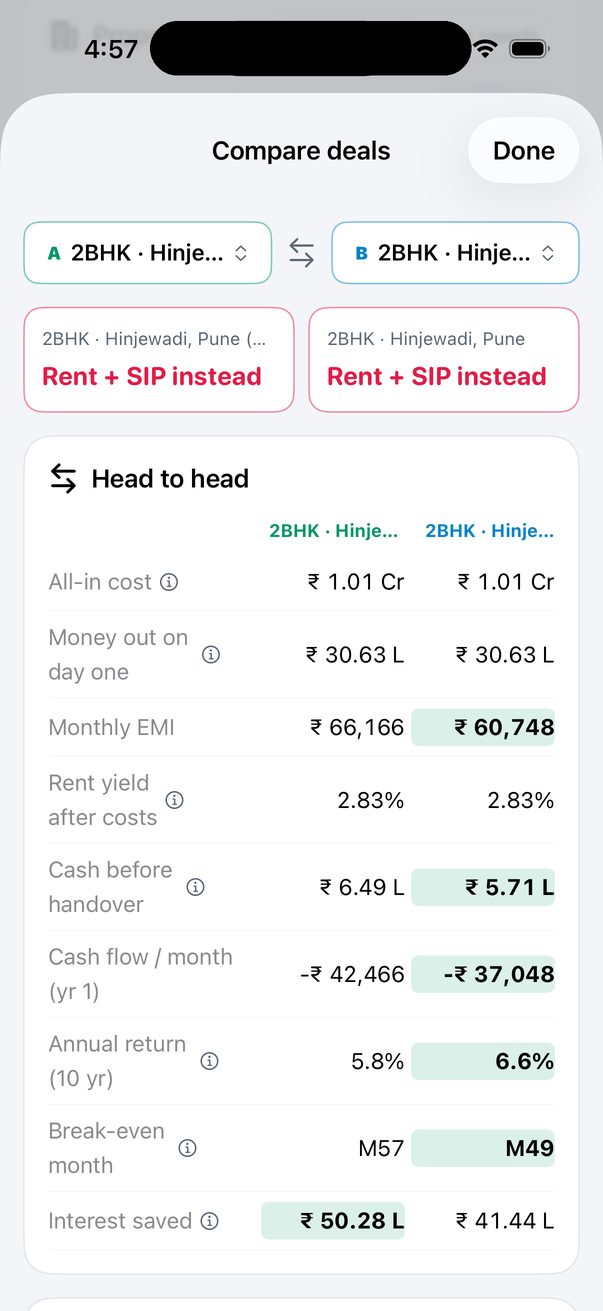
Pick deal A and deal B from the two menus at the top. You get each deal's verdict, a head-to-head table with the better value highlighted on every row, and a chart of both returns against the benchmarks.
| Row | Better is |
|---|---|
| All-in cost · Day-one cash · Monthly EMI · Cash before handover · Break-even month · Total interest paid | Lower |
| Rent yield · Cash flow per month · Annual return | Higher |
You need at least two saved deals; Duplicate is the quickest way to get a second one.
Share the verdict
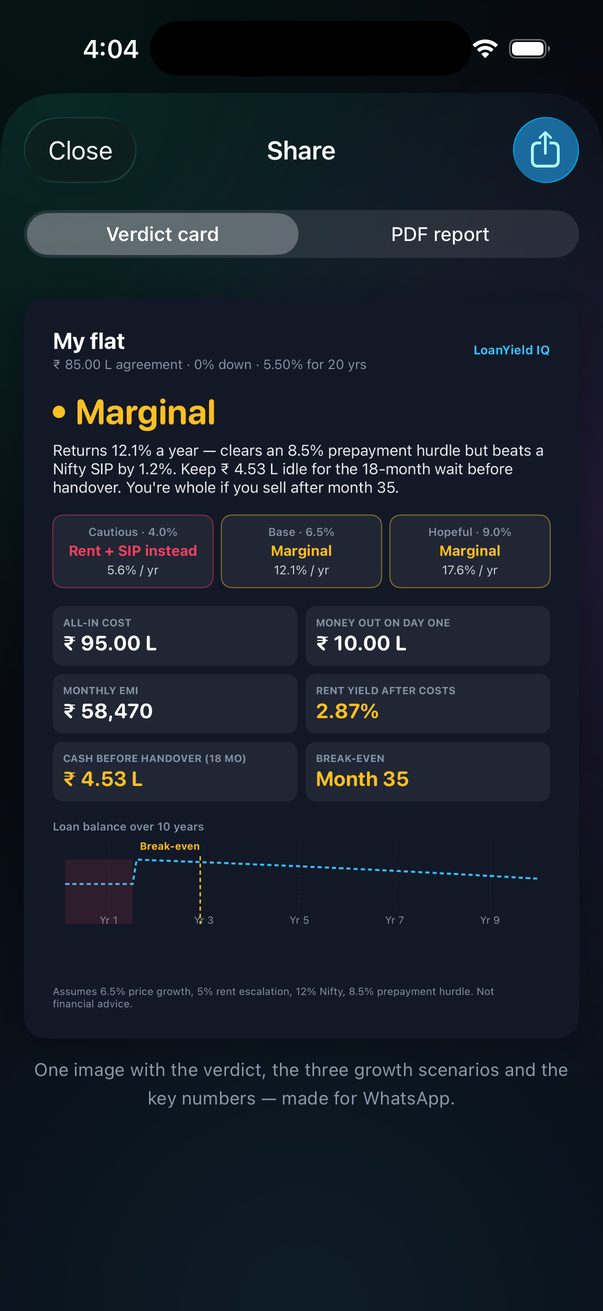
Tap Share on the verdict card and choose one of two formats:
| Format | What's in it | Best for |
|---|---|---|
| Verdict card | One image: deal name and terms, the verdict and headline, all three scenarios with their returns, six key numbers, the loan curve with break-even, and the assumptions. Fixed colours, identical on every phone. | WhatsApp, Messages, the family group |
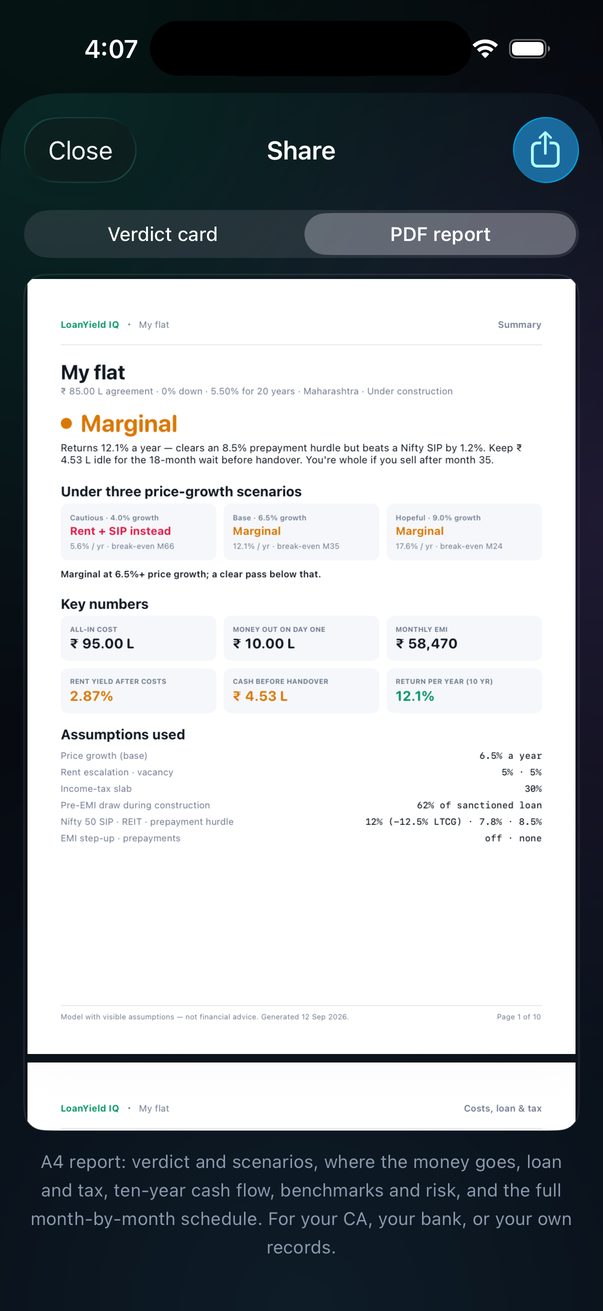
| PDF report | An A4 document: summary with scenarios and assumptions; where the money goes, loan and tax on rent; ten-year cash-flow table; benchmarks and the what-if table; the full month-by-month loan schedule with calendar dates. Page by page → | Your CA, the bank, your own records |
Both are generated on your phone and handed to the iOS share sheet — Mail, Files, AirDrop, print, anything.
The PDF report
Share → PDF report. An A4 document generated on your phone (about 10 pages for a 20-year loan), previewed in-app before you send it. It's the version of the analysis to give a CA, a bank, a co-buyer or your own records — everything the app computed, laid out to be read on paper.
| Page | Contents |
|---|---|
| 1 · Summary | Deal name and terms (agreement value, down payment, rate, tenure, state, GST category). The verdict in large type with its one-sentence rationale. All three price-growth scenarios side by side — call, return per year, break-even month — and the one-line summary of what the decision hinges on. Six key numbers: all-in cost, money out on day one, monthly EMI, rent yield after costs, cash before handover (or year-1 cash flow for a ready flat), return per year. Every assumption used: price growth, rent escalation and vacancy, tax slab, pre-EMI draw, the three benchmark rates, step-up and prepayments. |
| 2 · Costs, loan & tax | Where the money goes: agreement value, stamp duty at the state rate, registration, GST, builder extras, loan charges → all-in cost and day-one cash. Before handover (under-construction only): months to handover, pre-EMI per month, property tax during construction, cash needed before handover. The loan: amount, rate and tenure, base EMI, first full EMI date, months to close vs scheduled, total interest, interest saved by step-up/prepayments, MaxGain balance, joint-loan cap. Tax on rent, year 1: gross rent after vacancy → net annual value → Section 24(a) 30% deduction → Section 24(b) interest (capped) → taxable rent → income tax at your slab. |
| 3 · Ten-year cash flow | A year-by-year table after handover: rent in, EMI out (incl. prepayments), tax (property + income), net cash, loan left, flat value, equity. Followed by the break-even statement in words. |
| 4 · Benchmarks & risk | The same cheques five ways — this property leveraged, this property all-cash, Nifty 50 SIP, commercial REIT, prepaying debt — with return per year, wealth after 10 years and the basis of each. The what-if table: rate +100/+200 bps, rent 20% lower, empty 15% of the year, prices growing 4% and 9%, handover 12 months late — each with return, year-1 monthly cash and break-even. A paragraph stating how the verdict is decided. |
| 5+ · Loan schedule | Every month to closure: opening balance, EMI, interest, prepayment, closing balance, ~44 rows a page. With a first-EMI date set, each row carries its calendar month; months already paid are dimmed. |
Every page carries the deal name, a page count, the generation date and the note that it is a model with visible assumptions, not financial advice. Amounts use the same ₹ / L / Cr formatting as the app.
The report is for the deal currently selected. To compare on paper, switch deals from the Deals menu and export again — or use the in-app Compare screen for the side-by-side.
Scan a cost sheet
Tap the scan icon in the toolbar and pick a source: scan with the camera (multiple pages in one go), choose from Photos (one or more images at once), or choose a file (a PDF or image from Files). Each page is read on-device; rupee amounts (with Indian commas, or "L" / "Cr" suffixes) and percentages are picked out and listed below. Tap any detected amount and choose where it belongs — agreement value, rent, interest rate, property tax, floor rise, PLC or loan principal — and the field fills in.
Already have a photo of the cost sheet, or a PDF someone emailed you? Skip the camera entirely — Photos and Files work exactly the same way, and read multiple pages at once. Check every number it fills — OCR is a head start, not a source of truth.
My Loans
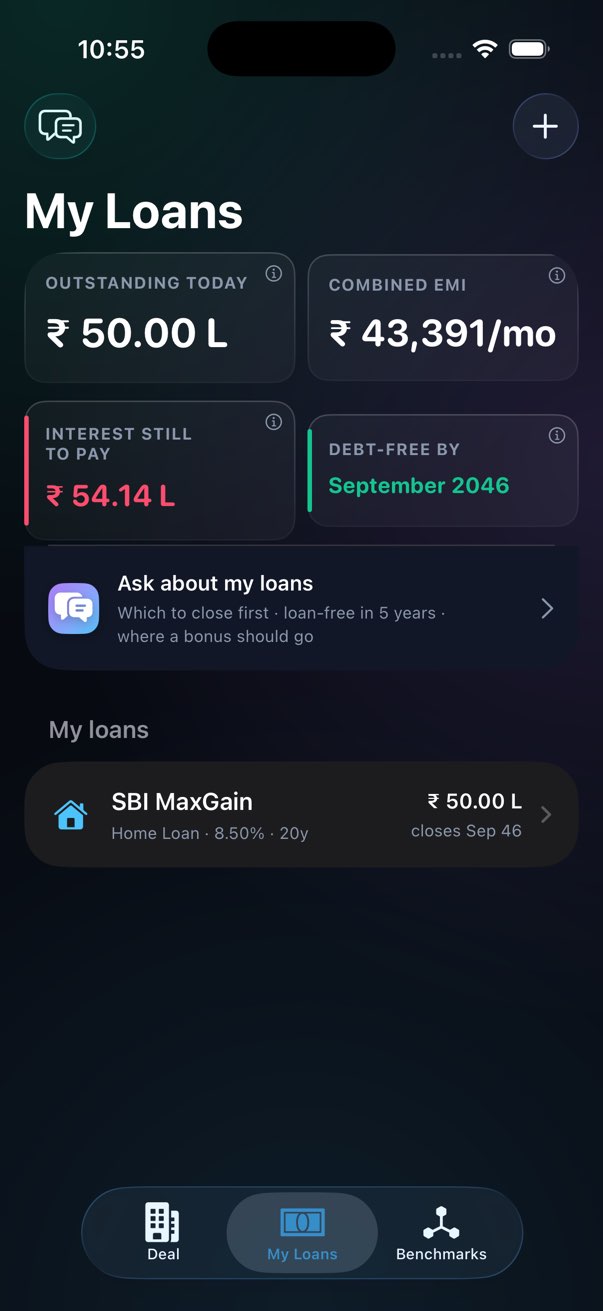
A separate vault for loans that aren't attached to a property deal — the home loan you already have, a car loan, a personal loan, a loan against property, or a MaxGain overdraft. Add one with the + button, either by importing a statement (next section) or by hand — or, if it's the loan behind a deal you're already tracking on the Deal tab, pull it in with zero re-entry (below).
Bringing in a deal's loan once it closes
A deal you're evaluating already has a full loan — rate, tenure, prepayments, everything — long before you'd want to plan its payoff here. Once the purchase is real, open the deal, expand Edit deal, and scroll to Deal closed? Track this loan at the bottom of the loan card. Confirm, and it appears in My Loans immediately.
It isn't a copy — it's the exact same loan record, now visible in both places. A prepayment or step-up you add from the My Loans workspace applies to the deal's numbers too, and vice versa. If you ever want it out of this list without touching the deal, delete it here and the app offers Remove from My Loans instead of a hard delete, since the deal still needs it.
Where you are in the loan
Because these loans already exist, each one asks for its first EMI date and what the amount you're typing represents:
| Amount below is… | Enter | The app then |
|---|---|---|
| Original loan amount | The sanctioned amount and the full tenure | Works out how many EMIs you've paid since the first EMI date, dims them in the schedule, and shows the balance outstanding today |
| Outstanding today | The balance on your latest statement and the years left — switch the Years / Months tab to type the exact number of months (e.g. 105) if that's what you know, since it's almost never a whole number of years | Starts the schedule from your next EMI date |
With a date set, every schedule row is labelled with its calendar month, the list shows when each loan closes, and the portfolio tiles show outstanding today, interest still to pay and the month you'll be debt-free.
A loan imported with schedule rows shows a green banner in its workspace — "N months from your bank's schedule" — and its schedule uses those actual rows for the paid months (dimmed, with a TODAY marker) before projecting the rest. The ⋯ menu on the banner removes the imported rows if you'd rather use the headline terms.
The payoff workspace
Tap a loan to open its workspace. Everything you change here is a scenario: the impact is computed live against your saved plan, but the loan itself isn't touched until you tap Save. Leave the screen or tap Reset and it stays analysis-only — so you can ask "what if I prepaid ₹2 L this Diwali?" without committing to it.
| Section | What you can do |
|---|---|
| Loan name | Right at the top of the workspace, styled like a proper title field — rename any time, saves immediately. |
| Scenario banner | Appears as soon as anything differs from the saved plan: "saves ₹X · N months earlier" versus what's saved. Save and Reset live in the top-right. |
| Impact tiles | Outstanding today, debt-free month, interest saved versus a plain EMI, interest still to pay and the total you'd prepay. |
| Charts | Two tabs. Payoff: three lines — plain EMI (grey), your saved plan (blue, only while a scenario differs) and the scenario (green); diamonds mark prepayments, a Today marker shows where you are. EMI split: a stacked bar per year showing how much of that year's EMI is interest versus principal, so you can watch the mix tip over as the loan matures. |
| Step up the EMI every year | Switch it on, choose the yearly increase (1–25%) and the first year it applies (default: year 2). Couldn't manage a raise one year, or stopped for a while? Tap Missed or skipped a raise to pause it for a year range (or indefinitely) instead of turning the whole thing off — years before and after the pause still count, and it can resume on its own later. The caption always tells you what turning step-up on or off is worth. |
| Prepayments | One-off: a lump sum in a specific loan month (shown with its calendar month). Recurring: an amount every month / quarter / 6 months / year, starting from a month you choose and optionally stopping after another — the "bonus every year" pattern. Add as many of each as you like; tap a recurring one to edit it — e.g. set an end month to stop it, or change the amount for when it starts again after a gap — instead of deleting and re-entering it. The list shows every one with a remove button and the total you'd prepay. You can also tap any month in the schedule. |
| Floating-rate resets | Log a rate change the bank actually applied (or one you expect) for this loan, with the month it takes effect. A switch at the top says what your bank does when the rate moves: keeps the EMI and moves the tenure (what most Indian lenders do) or raises the EMI and keeps the tenure. To apply one move to several loans at once, use Rate change? on the My Loans list instead. |
| Loan terms | Amount, rate, tenure, MaxGain balance and joint-borrower are part of the scenario. Type, first EMI date and amount basis save immediately (name saves immediately too, from its own field at the top). |
| Schedule | First 12 months inline; the full month-by-month schedule in a sheet, both reflecting the scenario. |
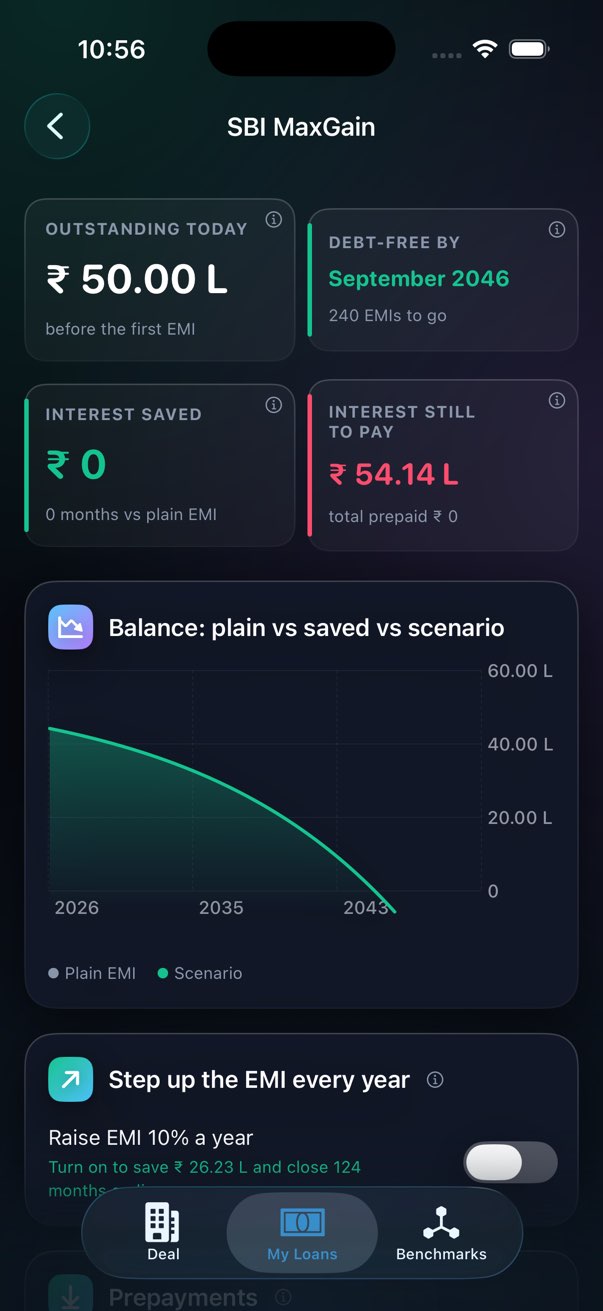
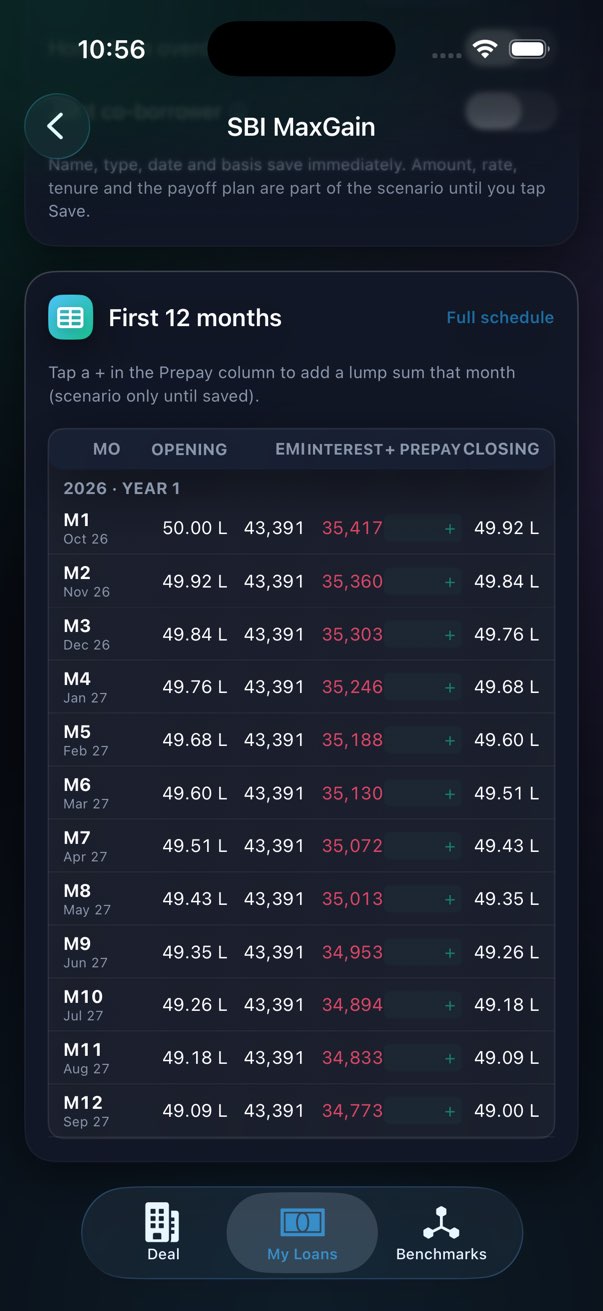
Planning: add your realistic prepayments and step-up, tap Save, and the loan's debt-free month becomes the one you're actually tracking. Analysis: pile on aggressive what-ifs, read the impact, and walk away — nothing is stored.
"Ask LoanYield IQ what happens if I prepay" — Siri asks for the amount in lakhs and the month, and tells you the interest and months saved on your first standalone loan.
When rates move: floating vs fixed, and applying a change to every loan
Every loan has a Rate type — Floating or Fixed — inside its workspace. Home, MaxGain and loan-against-property loans start as floating; car and personal loans as fixed. A repo or lending-rate move only touches floating loans; fixed ones are listed as not affected. The loan list shows each loan's current rate and type ("8.75% floating").
On the My Loans list, Rate change? opens one screen for the whole portfolio, so you don't open each loan to log the same move:
| Control | What it does |
|---|---|
| Hike or cut, and bps | Pick direction, tap 25 / 50 / 75 / 100 or set any size. |
| Takes effect after | How many EMIs are paid at the old rate first (0 = from your next EMI). Banks pass a repo change on at each loan's own reset date, so set it if yours has told you. |
| What your bank does | Keeps the EMI, stretches the tenure or raises the EMI, keeps the tenure. Saved on each loan. |
| Per-loan preview | Old rate → new rate and the result under your bank's behaviour — plus the other option underneath, so you can compare. Switch a loan off to leave it out. |
| Summary | Both outcomes totalled across the loans — same EMI (tenure and interest change) and same tenure (EMI and interest change) — followed by What I'd do. |
| Apply | Logs the change on every included floating loan as a normal rate reset. You can still edit or remove it in a loan's Floating-rate resets card. |
You can also just ask the chat — "RBI raised repo by 25 bps" — and tap Review & apply to floating loans on the answer, which opens the same screen with the move filled in.
Why "same EMI" costs more
When the bank keeps your EMI after a hike, the extra interest has to be paid off by running the loan longer, and the extra months themselves accrue interest. Raising the EMI instead pays that interest down sooner. For example, +25 bps on a ₹1.27 Cr loan at 7.15% with 108 EMIs left and a ₹95 L loan at 7.9% with 96 left:
| Same EMI | Same tenure | |
|---|---|---|
| Monthly EMI (both loans) | ₹2,93,612, unchanged | ₹2,96,438 (+₹2,826) |
| Tenure | +2 months on each | unchanged |
| Extra interest | +₹4.13 L | +₹2.91 L |
So paying the extra ₹2,826 a month avoids about ₹1.2 L of interest — effectively a guaranteed return at the loan's own rate. The app's advice follows from that: if the higher EMI fits your budget, ask the bank for it; if cash is tight, keep the EMI and prepay a single lump sum (about ₹2.1 L here, computed per loan) to win the months back, putting spare money into the loan with the highest rate first. On a rate cut it says the reverse: keep paying the old EMI so the loan finishes sooner. Figures assume monthly compounding and that the new rate applies from the chosen EMI.
Turn on Remind me about my loans in Settings and each tracked loan nudges you 6, 3 and 1 month before it's debt-free, and again the month it closes. Home and MaxGain loans also get a reminder every few months to log a rate reset, so the payoff plan doesn't quietly drift out of date. Everything is computed and scheduled on your device — nothing is sent anywhere, and it's off by default.
Import a statement
My Loans → + → Import from a statement. Pick a PDF or image from Files, a photo or screenshot from Photos, or scan the paper with the camera (multiple pages are fine).
- 1The text is read on your phone
PDFs with selectable text are read directly; scans and photos go through on-device OCR.
- 2The loan details are picked out
Loan amount, outstanding balance, interest rate, tenure, EMI, first EMI date and lender — by Apple's on-device model where available (or your own cloud key if you added one), with a pattern-matcher as backup. The two are cross-checked: if they disagree on an amount, the one that's physically plausible wins (the EMI must cover the interest; outstanding can't exceed the original loan).
- 3If it's an amortization schedule, the rows are read too (details)
Month-by-month tables are recognised whatever the bank's column order — the app works out which column is the balance (it falls), which is the EMI, and which are interest and principal (they add up to the EMI; interest falls, principal rises). Those rows become history: the months already paid are taken from the bank's numbers, including any prepayments (a balance drop bigger than the principal component) and rate changes (a lasting shift in interest ÷ balance) it can see. The app then projects forward only from the last row. A card on the review form shows what was found — rows and dates, opening → closing balance, latest EMI and implied rate, prepayments, rate changes — with a switch to use or ignore them.
- 4You review, then add
A form shows what was read. "Years left" is derived from the EMI on the statement, and a green tick confirms the EMI matches the terms — an amber warning means something was misread; adjust and the tick returns. Nothing is saved until you tap Add loan. "Text that was read" shows the raw OCR if you want to check.
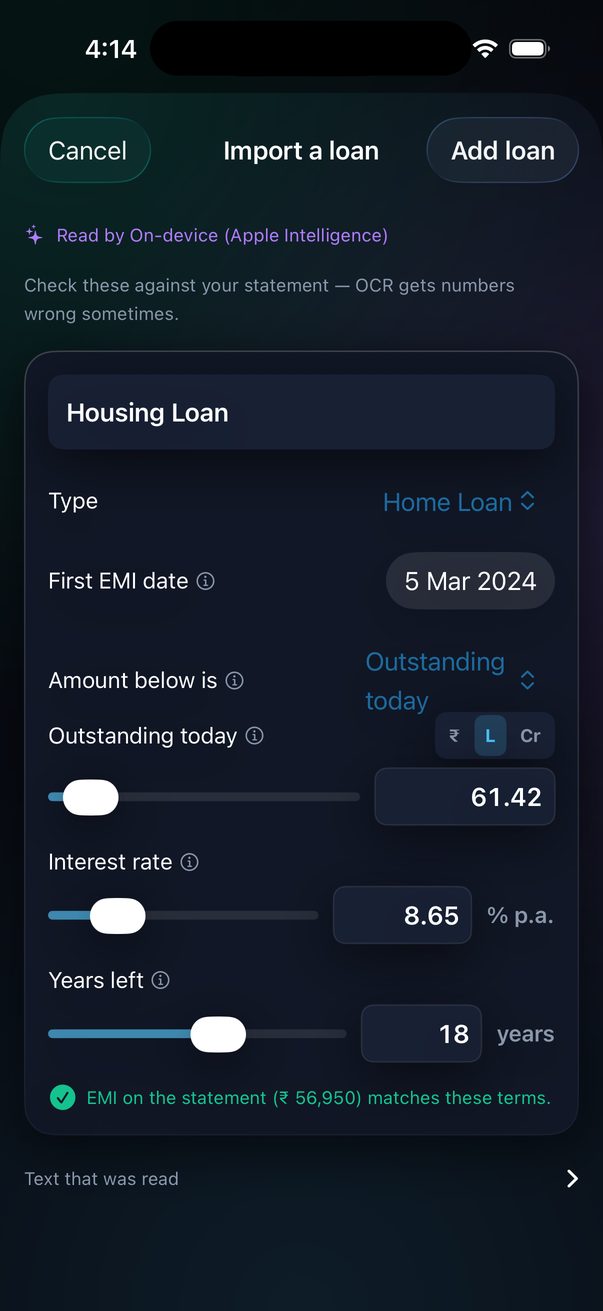
The statement text never leaves your phone unless you have added your own AI key in Settings, in which case it is sent only to that provider, only for this extraction.
Upload an amortization schedule
The most accurate way to add an existing loan. Banks issue a repayment schedule (HDFC, SBI, ICICI, LIC HFL and others all do, from net-banking or on request) — a table with one row per month. Upload it via My Loans → + → Import from a statement and the app reads the rows themselves, not just the headline terms.
What to upload
| Source | How | Notes |
|---|---|---|
| PDF from net-banking | Save to Files (or share from Mail/WhatsApp to Files), then Choose a PDF or image | Best results — text is read directly, no OCR errors. |
| Scanned PDF | Same | Pages are rasterised and OCR'd on-device (first 6 pages). |
| Screenshot / photo | Pick from Photos | One page per image; crop to the table for best accuracy. |
| Paper | Scan with the camera | Multi-page scanning; hold steady, good light. |
What the app reads from the rows
Column order doesn't matter and headers aren't required — columns are identified by how the numbers behave:
| Column | Recognised because |
|---|---|
| Closing balance | It falls across the rows and is the largest figure. |
| Opening balance (if present) | It equals the previous row's closing balance. |
| EMI · Interest · Principal | Two of them add up to the third on most rows; interest falls over time while principal rises. |
| Date | Any of the usual Indian formats (05/03/2024, 05-Mar-24, Mar 2024 …). |
| Serial / month number | Ignored (small integers without commas). |
From those rows it derives:
- Months already paid — exactly the rows in the table, so "outstanding today" and "EMIs paid" match the bank.
- Prepayments — any row where the balance fell by more than the principal component of the EMI.
- Rate changes — a lasting shift in interest ÷ opening balance (the implied annual rate), typical of repo-linked resets.
- Latest EMI and implied rate — used to project the remaining months, and to derive years left from the EMI rather than trusting a printed tenure.
- First EMI date — the first row's date, which anchors every schedule month to a calendar month.
Review before saving
The review form shows a green schedule rows card: how many rows and their date range, opening → closing balance, latest EMI and implied rate, prepayments found, rate changes found — and a switch to use the rows as history or ignore them. The usual EMI cross-check (green tick / amber warning) still applies. Tap Add loan and the loan opens with a banner, "N months from your bank's schedule"; its schedule uses the actual rows for those months (dimmed, with a TODAY marker) and projects only from the last row's balance. Your payoff plan — step-ups, prepayments — applies to the projected months.
Tables with fewer than three usable rows, or where the balance doesn't fall, are ignored and the import falls back to headline terms (amount, rate, tenure, EMI, first EMI date). The "Text that was read" panel on the review form shows the raw text so you can see why.
Row parsing is entirely on-device and never uses a language model. Only the headline extraction touches a model (Apple's on-device one, or your own key if you added it).
Ask about my loans
My Loans → the Ask about my loans card (or the chat icon top-left). A chat that answers questions across every loan in your vault. The important design choice: every number comes from the amortization engine, never from a language model. The model — Apple's on-device one, or your own key — only phrases answers, adds a short takeaway, and handles free-form questions from a fact sheet the engine wrote. Without any model the chat still answers everything below.
| Ask | You get |
|---|---|
| Which loan should I close first? | The avalanche order by effective rate — home-loan interest is deductible under Sec 24(b), so a 8.5% home loan can be cheaper money than a 10% car loan. If rates are within 1% of each other it recommends the snowball instead (smallest balance first, for the cash-flow win). |
| I want to be loan-free in 5 years (or "by 2030") | Two routes, per loan and in total: the extra EMI from now, or the lump sum today that keeps EMIs unchanged — plus the interest avoided and which loan to start with. |
| I have ₹5 L to prepay — where? | Interest saved and months saved on each loan; the best one is named, with the runner-up's shortfall. |
| What if I pay ₹10,000 more every month? | Same comparison for a recurring top-up. |
| Rates rise 25 bps? / "RBI raised repo by 25 bps" | Floating loans only. For each: the result if your bank keeps the EMI (tenure and interest change) and if it raises the EMI (EMI and interest change), then a combined Summary, a What I'd do recommendation, and a button that opens Rate change to apply it to all of them. |
| Prepay or invest ₹5 L? | The engine compares two futures to your loan's original end date: prepay and invest every rupee of EMI you no longer owe, or keep the loan and invest the lump sum. Equity gains are taxed at 12.5% LTCG; the assumed market return (12%) is shown, with the break-even return — the yearly return at which the two tie. A one-tap Add prepayment follows if prepaying wins. |
| Cheaper lender at 7.4%? | Monthly saving, the one-time cost of switching (fee % plus 18% GST) and the break-even in months against how long the loan has left. It always ends with the cheapest move first: ask your own bank for a spread cut — it costs nothing. |
| Prepay ₹2 L in March / "pause my step-up in year 4" | The chat proposes the change with before/after numbers and a confirm button. Nothing is edited until you tap it; a missing detail (which loan? how much?) is asked back. |
| How much interest this year? | Next-12-month and remaining interest, per loan. |
| Where do I stand? / a loan's name | Totals, EMIs, debt-free month; or one loan's details. |
Answers that point at a loan carry an Open this loan button that jumps to its workspace, where you can turn the suggestion into a scenario and save it. Suggestion chips under the chat cover the common questions.
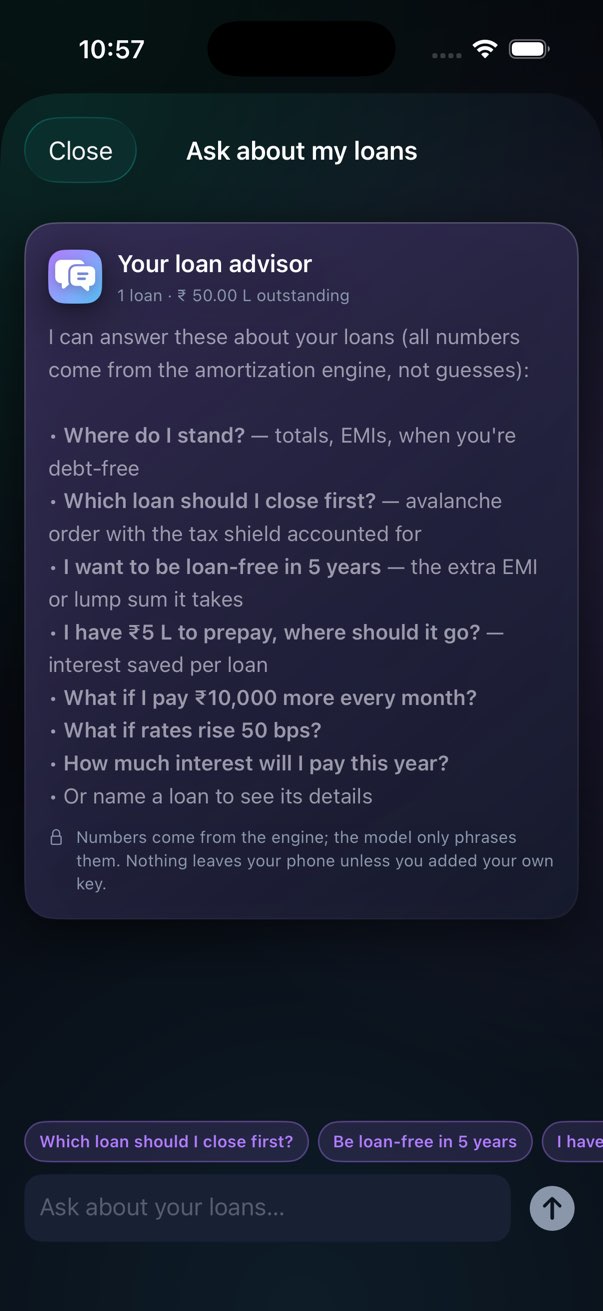
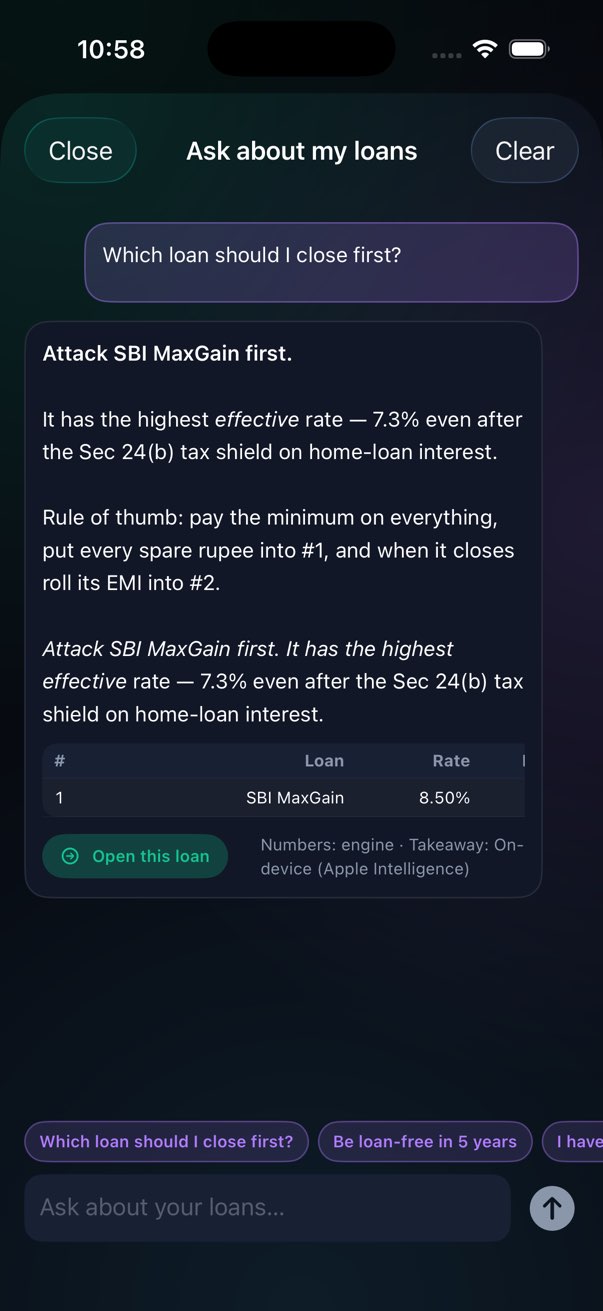
It remembers, and it understands how you talk
Short follow-ups reuse the last question: "and at 50 bps?", "just Loan 2", "what about ₹10 L". Write the way you speak — including Hindi or Hinglish ("RBI ne repo badhaya, mera EMI kitna badhega"). The on-device model only turns your sentence into a structured request (which question, which loan, how much); the engine does all the arithmetic, and anything that would change a loan waits for your tap. A rate move with no size is read as RBI's usual 25 bps.
Do this next
At the top of My Loans, a card names the single best next move — for example putting spare money on the loan with the highest effective rate — and tapping it opens the chat with that question already asked.
Computed answers never leave your phone. Free-form questions and takeaways go to Apple's on-device model, or to your own cloud key if you added one — and only as the engine's fact sheet plus your question.
Benchmarks & Risk
10-year annualized return
Five bars: this property leveraged (net of capital-gains tax on the eventual sale), the same property bought all-cash — same rent, same price growth, but no loan and no interest deduction, so it isolates what the leverage itself is adding or costing you — a Nifty 50 SIP (12% CAGR, post 12.5% LTCG), a commercial REIT (7.8% distribution yield), and prepaying existing debt (8.5% risk-free, post-tax).
On a deal with an expensive loan, the all-cash bar can come out ahead of the leveraged one — a clear sign the loan is what's dragging the return down, not the property itself.
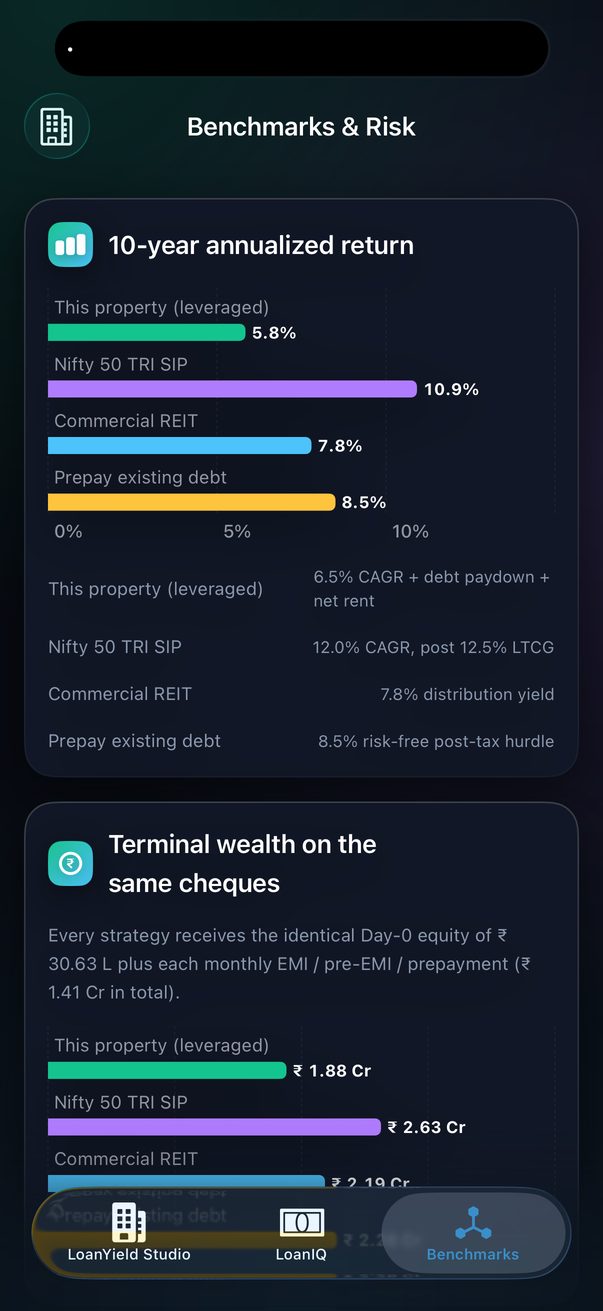
What you'd have after 10 years
Every strategy receives the identical money — day-one equity plus each monthly EMI, pre-EMI and prepayment — so the rupee outcomes are directly comparable. The property's wealth is its value minus capital-gains tax on selling and the loan outstanding, plus all the net rent it collected.
Risk: sensitivity shocks
Titled What if things go wrong? — the deal recomputed under: rate +100 and +200 bps, rent 20% lower, empty 15% of the year, prices growing only 4% (and 9%), handover 12 months late, and no EMI step-up. Each row shows the return per year and monthly cash flow, coloured relative to your base case above it — not an absolute bar. A shock reads red only if it actually makes the deal worse than what you're already looking at; identical-to-base rows (a late handover often changes nothing about the 10-year return) stay neutral, and a shock that happens to help reads green.
Settings
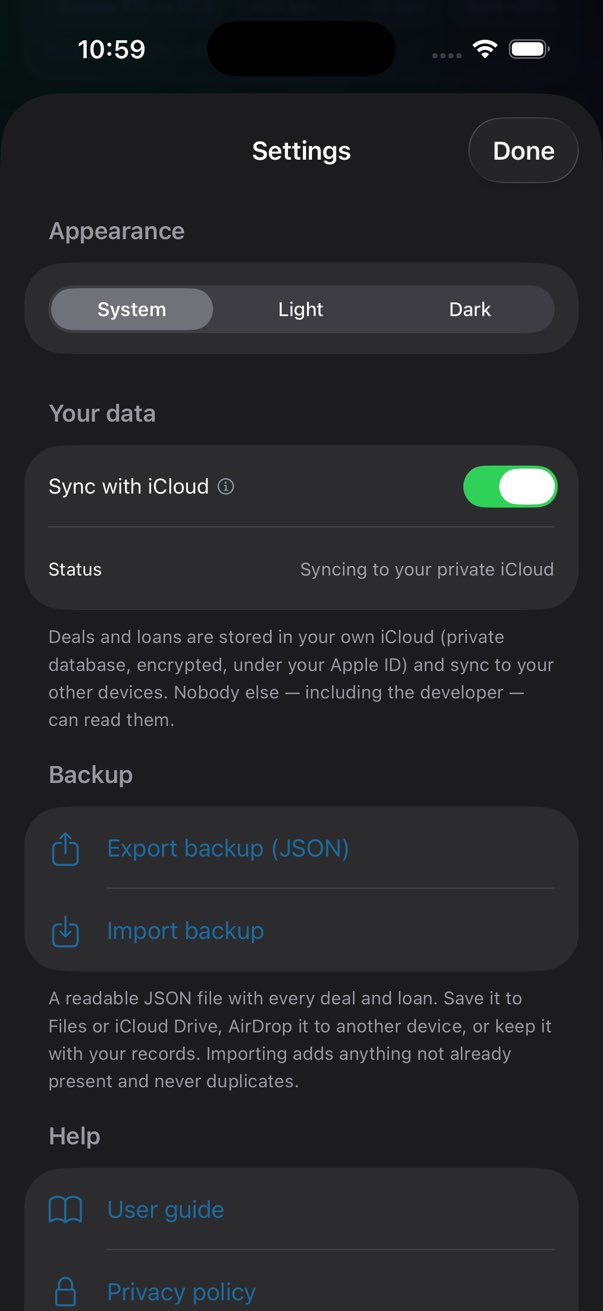
Gear icon in the Deal toolbar. The ? next to it opens this guide.
| Setting | What it does |
|---|---|
| Appearance | System · Light · Dark. |
| Your data · Sync with iCloud | On by default. Deals and loans live in the private database of your own iCloud — encrypted, under your Apple ID, unreadable by anyone else including me — and sync to your other devices. Changing it takes effect at the next launch. The Status line says what's actually in use. |
| Backup · Export / Import | Export writes every deal and loan to a readable JSON file and hands it to the share sheet (Files, iCloud Drive, AirDrop, Mail). Import reads such a file back and adds anything not already present — re-importing never duplicates. |
| Notifications · Remind me about my loans | Off by default. Turning it on asks for notification permission, then schedules local, on-device reminders for every tracked loan in My Loans — see My Loans → Reminders. |
| Help | Links to this guide, the privacy policy, and email. |
| About | Version, the developer (Aniket Shetty, linking to aniketshetty.com) and more apps. The WhatsApp verdict card and the PDF carry a small "Made with LoanYield IQ · by Aniket Shetty" line; nothing else is branded. |
| AI memo | Shows whether the memo runs on-device (Apple Intelligence) or via the built-in rules engine. |
| Advanced: bring your own AI key | Optional. Expand to pick Anthropic Claude, Google Gemini or OpenAI. Each provider has a Get a key link straight to its console and three numbered steps for generating one, so you don't need to leave the app to figure out where to start. Paste the key in; it's stored in the iOS Keychain (after-first-unlock, this device only) and used only to call that provider directly. The model name is editable. |
The memo works without one. Cloud keys are for people who already have them; the app never sends your deal anywhere unless you add a key and press Generate.
Every slider and money field reads as one labelled, adjustable control to VoiceOver instead of a handful of unlabelled parts; charts carry a spoken summary of what they show; text follows Dynamic Type sizing; and colour is never the only signal — every verdict, tile and chart is backed by text, checked against WCAG AA contrast in both light and dark mode.
How the maths works
Everything is computed on your phone from the formulas below. Nothing is fetched.
All-in cost
Agreement value = base cost + floor rise + PLC.
Statutory levies = stamp duty (state rate × AV, or your own override amount) + registration (1% of AV, capped at ₹30,000 in Maharashtra) + GST (rate × AV).
All-in cost = AV + statutory levies + builder extras + loan charges.
Day-one cash = AV × down payment % + statutory levies + builder extras + loan charges.
Pre-EMI during construction
Each month before handover: 62% of the sanctioned loan × monthly rate. Cash before handover = the sum of those months plus property tax for the period. No rent is assumed until handover.
The loan
EMI = P·r·(1+r)ᴺ ÷ ((1+r)ᴺ − 1), with r the monthly rate and N the months.
Step-up: EMI in year y = base EMI × (1 + step-up)^(y−1).
Prepayments reduce principal in the month entered. MaxGain: interest each month accrues on max(0, balance − parked balance).
Payoff plans
Step-up: EMI in year y = base EMI × (1 + step-up)^(y − first-raise-year + 1), for y ≥ the first-raise year. Recurring prepayments expand into one amount per scheduled month and add to any one-off in the same month. Imported schedule rows replace the engine for months 1…k; the projection starts from the last row's closing balance with the remaining months, and your plan applies to the projection months.
Advisor solvers
Close-first order: effective rate = rate × (1 − slab × shielded share), where shielded share = min(annual interest, ₹2 L) ÷ annual interest for home loans and 0 otherwise. Debt-free in N months: needed EMI = EMI(outstanding, rate, N); extra = needed − current EMI; or lump sum = outstanding − present value of the current EMI over N months. Where a lump sum goes: interest saved per loan from a schedule with that sum prepaid in month 1.
Tax
Net annual value = rent × 12 × (1 − vacancy) − property tax.
Section 24(a): 30% of NAV is deductible — this is treated as covering maintenance too, so maintenance / society charges aren't separately deducted from taxable rent.
Section 24(b): by default the full interest is deductible with no cap — every deal here is modelled with rent, i.e. let-out, where the law allows 100%. Switch off Full Section 24(b) deduction to instead cap it at ₹2 L (₹4 L if joint), the more conservative self-occupied-style rule.
Taxable rent = max(0, NAV − 24(a) − 24(b)), taxed at your slab.
Monthly cash flow = rent − EMI − property tax − maintenance − tax.
Return and break-even
Capital-gains tax on sale = 12.5% × max(0, sale value − cost of acquisition), where cost of acquisition is the agreement value plus statutory levies and builder extras (loan charges are financing costs, not part of the property's cost, so they're excluded) — the flat rate for a purchase made today, with indexation no longer available. This is subtracted wherever the app assumes a sale.
Return per year is the XIRR of: −day-one cash, then each month's cash flow (lump sums included), then in month 120 the flat's value at your growth rate minus capital-gains tax on that value minus the loan still outstanding.
Break-even is the first month where value − capital-gains tax − loan obligation + cumulative cash flow ≥ 0. Before handover the obligation is the full sanctioned loan, not just the part drawn, because the rest is still owed to the builder.
Benchmarks
The same contribution stream — day-one cash and every monthly outflow — is grown at 12% (Nifty, then 12.5% LTCG on the gain), 7.8% (REIT) and 8.5% (prepaying debt). Their annualized figures are the XIRR of that stream. The all-cash comparison instead reruns the full property model with the loan removed: day-one outflow becomes the entire cost of acquisition (no down-payment split, no loan charges), monthly cash flow drops the EMI, and taxable income drops the Section 24(b) interest deduction it would no longer be entitled to — same rent, same escalation, same vacancy, same price growth and the same 12.5% capital-gains tax on exit as the leveraged version.
Cash-on-cash return
Year-one net cash flow (after handover) × 12, divided by day-one cash — not the all-in cost, which is what rent yield divides by. The two agree only when there's no loan.
DSCR
Net operating income in year one (effective rent minus property tax minus maintenance, before EMI and before income tax) divided by that year's total EMI. Shown only for a commercial purchase with a loan.
Return by exit year
For each year 1…10: the same XIRR construction as the ten-year return above, but truncated — flows only up to that year's last month, with the terminal add-on (value minus capital-gains tax minus loan outstanding) applied at that month instead of month 120. The year with the highest resulting XIRR is what "Return peaks around year N" reports.
The verdict rules
| Call | Rule |
|---|---|
| Buy | Return ≥ the Nifty SIP figure, and cash before handover ≤ 30% of day-one cash |
| Marginal | Return ≥ 8.5% but below the Nifty SIP — or Buy on return but a heavy pre-handover cash burden |
| Rent + SIP instead | Return below the 8.5% risk-free prepayment hurdle |
These thresholds are deliberately simple and visible. They are one reasonable opinion, not the only one.
Glossary
| Agreement value | The registered price; stamp duty and GST are charged on it. |
| PLC | Preferential Location Charge — extra for a corner, park-facing or high-floor unit. |
| Floor rise | Builder premium per floor for higher storeys. |
| Advance maintenance | 12–24 months of society charges collected upfront at possession. |
| MODT | Memorandum of Deposit of Title Deed — stamp duty on the mortgage, 0.2–0.5% of the loan. |
| Franking | Bank charge for stamping the loan agreement. |
| Gestation | Months between booking and handover on an under-construction flat. |
| Pre-EMI | Interest-only payments on the disbursed part of the loan during construction. |
| Step-up | Raising the EMI by a fixed % every year as income grows. |
| MaxGain | Home-loan overdraft where parked money offsets interest while staying withdrawable. |
| Section 24(a) | Flat 30% deduction on net rental income for repairs. |
| Section 24(b) | Home-loan interest deductible against rent — 100% of it, uncapped, by default, since every deal here is let-out. Switch off Full Section 24(b) deduction to cap it at ₹2 L (₹4 L joint) instead, the self-occupied-style rule. |
| Fit-out cost | What it costs to fit out a bare-shell shop or office — flooring, wiring, ceiling, HVAC — before it can open for business. Commonly 15–25% of the purchase price; easy to leave out of the maths. |
| Brokerage | The agent's fee, entered as a flat amount or a % of the price. Part of the all-in cost and day-one cash, same as any other builder extra. |
| XIRR | Annualized return that accounts for the timing of every cheque in and out. |
| LTCG | Long-term capital gains tax — 12.5% flat, no indexation, on equity gains (the Nifty benchmark) and on the property's own gain over its cost of acquisition whenever the app assumes a sale. |
| Break-even | The month from which selling — after capital-gains tax — would return everything you've paid in. |
| Recurring charges | Monthly society / maintenance charges from handover onward. Cuts cash flow, not taxable income — the flat 30% repair deduction already covers it. |
| First EMI date | When the first full EMI was (or will be) debited; anchors the schedule to calendar months. |
| Amount basis | Whether the amount you typed for an existing loan is the original sanction or today's outstanding. |
| Scenario | Unsaved changes in a loan's workspace, computed against the saved plan; Save commits, Reset discards. |
| Recurring prepayment | A lump sum repeated every month / quarter / 6 months / year between two loan months. |
| Row-level import | Reading an amortization schedule's actual rows as history, including prepayments and rate changes visible in the numbers. |
| Property kind | Flat / house, shop / office, or plot — sets GST, whether a loan applies, and defaults. |
| Price basis | Whether a quoted price is the agreement value or a builder's all-in figure with taxes bundled. |
| Floating rate | A rate tied to a benchmark (the RBI repo rate, a bank's MCLR) that moves when the benchmark does — most home loans. A fixed-rate loan ignores those moves. Set each loan's Rate type so a rate change only touches the right ones. |
| Effective rate | A loan's rate after the Sec 24(b) tax shield — what the money really costs you; the advisor ranks loans by it. |
| Avalanche · snowball | Paying off the highest-rate loan first (saves the most) vs the smallest balance first (frees cash flow soonest). |
| Cash-on-cash return | Year-one net cash flow divided by the cash you actually put in on day one — distinct from rent yield, which divides by the full all-in cost. |
| This property (all-cash) | The same deal bought outright — same rent, same price growth, no loan — shown as a benchmark bar to isolate what leverage itself is adding or costing you. |
| DSCR | Debt Service Coverage Ratio — net operating income over the annual EMI. Below 1.0 means rent alone can't cover the loan payment; commercial lenders typically want 1.2+. Shown only for a commercial purchase with a loan. |
| Return by exit year | The annualised return and terminal wealth if you sold at the end of each year instead of the full ten — tap "Return peaks around year N" on the verdict card. |
FAQ
Why is my yield red when it's a positive number?
Because it's judged against your loan rate. A 3% yield on money borrowed at 8.5% means the flat costs you 5.5% a year to hold, before price growth. Red is the honest colour.
The verdict says Rent + SIP. Is the app anti-property?
No — it's anti-assumption. Set price growth to 9% and most Indian metro deals turn Marginal or Buy. The point of the three scenarios is to show you exactly how much of the decision is riding on that number.
Does "Cash before handover" include my rent elsewhere?
No. It's the pre-EMI interest plus property tax on the new flat. Whatever you pay in rent to live somewhere meanwhile is on top.
Why does the loan curve jump up at handover?
During construction the bank disburses progressively (modelled at 62% on average). At handover the full sanctioned amount is outstanding and the real EMI begins.
My state isn't Maharashtra, Karnataka or Delhi.
Choose Other (6% stamp duty, 1% registration), then switch on Override stamp duty under Property › More and type your actual figure — no more adjusting mentally. Or tell me your state's schedule and I'll add it properly.
Does the return account for tax on selling the flat?
Yes. Every return figure, terminal wealth number and the break-even month already subtract capital-gains tax (12.5%, no indexation — the current rule for a purchase made today) on the gain over cost of acquisition, wherever the app assumes a sale at the end of the horizon or at break-even. The Nifty benchmark was always taxed this way; the property side now is too, so the two are comparable.
Can I add my society maintenance?
Yes — Property › More › Maintenance / society charges (monthly). It reduces your monthly cash flow and the rent-yield tile, but not your taxable rental income, since the flat 30% repair deduction already stands in for actual maintenance spend under Indian tax rules.
Can I import my existing loan?
Yes — My Loans → + → Import from a statement. A PDF, photo or scan of a statement, sanction letter or amortization schedule. Schedules are read row by row, so paid months, prepayments and rate resets come from the bank's own numbers. You review before anything is saved.
Are the chat's answers trustworthy?
The numbers are — they come from the same amortization engine as every screen in the app, and each answer shows a table you can check. A language model, when available, only phrases the answer and handles free-form questions from a fact sheet the engine wrote; it never invents figures. The strategy it gives (avalanche by effective rate) is the standard one; your circumstances may argue otherwise.
I changed things in a loan and they vanished when I came back.
That's by design: workspace changes are scenarios until you tap Save. If you meant to keep them, make the change again and tap Save.
Is my data backed up?
Two ways. With iCloud sync on (the default), deals and loans live in your own private iCloud and come back on a new device or reinstall. And Settings → Backup exports everything as a JSON file you keep wherever you like, and imports it again without duplicating.
Why is there a "this property (all-cash)" bar in Benchmarks now?
It's the same property, same rent, same price growth — just bought outright instead of with a loan. Comparing it to the leveraged bar right above it tells you whether the loan itself is helping or hurting: if all-cash returns more, the loan's rate is higher than what the property is actually earning you, and leverage is working against you on this specific deal.
Can I model a plot with a loan?
Plots are modelled as bought outright, which is how most plot purchases work and keeps the maths honest (no Section 24 shield, no pre-EMI). To test a plot loan, choose Flat / house as the kind and set the terms — only GST differs, and land has none.
Is this financial advice?
No. It's a model with visible assumptions. Talk to your CA, and read the agreement.
Troubleshooting
| Symptom | What's going on |
|---|---|
| A label at the top looks cut off | It shouldn't — labels wrap to two lines. If one still does at your text size, tap the tile: the hover card shows the full label and value. Please email a screenshot. |
| I typed a value and it snapped back | Only if it was outside the hard bounds (e.g. a 150% rate). Anything sensible is accepted; the slider stretches to it. |
| The verdict changed when I only changed the rent | Rent feeds the yield, the tax and the ten-year return; a small rent change can move the return across the 8.5% or Nifty line. Check the three pills — usually only one scenario flipped. |
| Builder extras says "not added" | Quick Start doesn't guess builder charges. Add floor rise, PLC, advance maintenance and infra under Property › More; the all-in cost will rise. |
| Import read the wrong amount | OCR and language models both occasionally misread Indian comma grouping. The review form flags an EMI mismatch in amber; correct the amount and the tick turns green. Nothing is saved until you tap Add loan. |
| Scan found no amounts | OCR needs a reasonably sharp, well-lit page. Recrop to just the numbers, or try Choose a file if you have the cost sheet as a PDF — text-native PDFs read most accurately. |
| AI memo says "Built-in rules engine" | Apple Intelligence isn't available on this device or iOS version. The memo still works; it's written from the same numbers by the rules engine. |
| My deals aren't on my other device | Check Settings → Your data on both: sync must be on, both signed into the same Apple ID with iCloud Drive enabled, and the app launched once after turning it on. Sync is usually seconds but can take longer after a fresh install. A JSON backup works regardless. |
| My state isn't listed | Choose Other (6% duty, 1% registration), or switch on Override stamp duty under Property › More and type the real figure. Email me the schedule for your state and I'll add it properly. |
Privacy
No account, no analytics, no ads, no crash-reporting SDKs. Deals and loans live in SwiftData on your device. Any AI key you add lives in the Keychain and is used only to call that provider directly from your phone. Full policy: aniketshetty.com/loanyieldiq/privacy.
Questions or a state schedule to add? aniket.shetty@gmail.com